
Go For AI
Type in the search box above for quick search in Pluingtutor.
BECOME A CONTRIBUTOR
Interested in getting your articles published with us ?
Powered By:

Melodics

Recording Karaoke using Audacity

Audacity is a free, simple, multi-track audio editor and recording Software, which available for different platforms like Windows, Mac OS X, GNU/Linux.

You can download this Software from here

Step One – Open audio file e.g. format wav or mp3  File -> Open
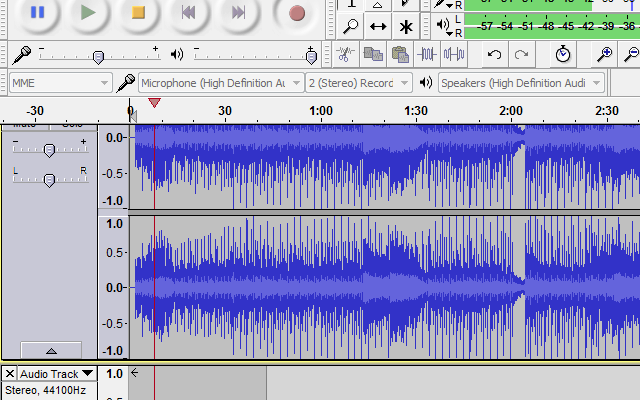
Audacity Recording
Audacity Recording and Vocal Track

Step Two – In new version of Audacity by default the voice track record in other track is checked. To make sure please open Edit -> Preferences and check the Overdub:play other tracks while recording new one is checked. You can also set the other properties of recording.

Now make sure your lyrics is ready and you can read while record the voice and click or record button to start the recording. Now you can see the recording track is separate from your karaoke track while playing.

After finish your record now you can export the file by click File -> Export.

Tags: , , , ,

Comments are closed.

AI MUSIC FOR YOUR CREATIVE UNIVERSE

Generate Music

Collaborate with AI to create, customize and release unique music to social media,

Tags

GreatSynthesizers

RYK Modular 100M modules: creative art!
… there are moments when you wish you had a bank account with no limits. All the beautiful – and… Read more
Waldorf Protein: first member of a new product line
Small, handy, colorful, and affordable… Waldorf is keeping up with the latest synthesizer trends and launched its new product line… Read more
AS500-SEQ – a different kind of analog step sequencer
This is a tool for creative musicians. With 64 (2×32) steps, the AS500-SEQ offers flexible step/row combinations that break up… Read more
Oberheim OB-1 – unrivaled lead-synth with memories
The OB-1 belongs to the timeless elite of classic mono synthesizers. It ranks among the very best and shares its… Read more
  • Post Categories
  • Search Topic
    Powered By:

    Melodics

    logowordpressSelect Option