



Using Web Audio API
At first you have to create the a single instance of AudioContext Which can support multiple sound inputs.
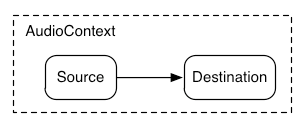
That means a single AudioContext instance can manage single or multiple Sources to a single Destination.
The connection between Source and Destination doesn’t need to be direct, it can go through any number of AudioNodes like audio filter, effects, audio gain etc. which act as audio effects for the audio signal.

or
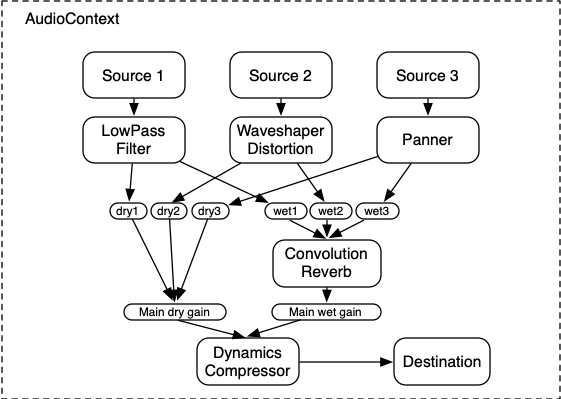
For using web audio API you have to create instance fast.
Example :
Create Instance
window.AudioContext = window.AudioContext||window.webkitAudioContext;


context = new AudioContext();
Load Sound
var source = context.createBufferSource();
source.buffer = Buffer;
source.connect(context.destination);
source.start(0);
The API supports loading audio file data in multiple formats, such as WAV, MP3, AAC, OGG
Tags: Audio Context, Web Audio API